


日前在處理 170 多個 BlendShape 時處理設定的 Mapping,
那堆 1080×1920 螢幕也不能完全顯示的 Popup 當中用滑鼠點取自己需要的項目真的非常有難度.
為了可以在超過 100多個的選項當中找出自己需要的字串, (是眼力訓練的一種)
所以花了點時間把一直想用的 Auto Complete 功能做出來….
嗯… 一半罷.
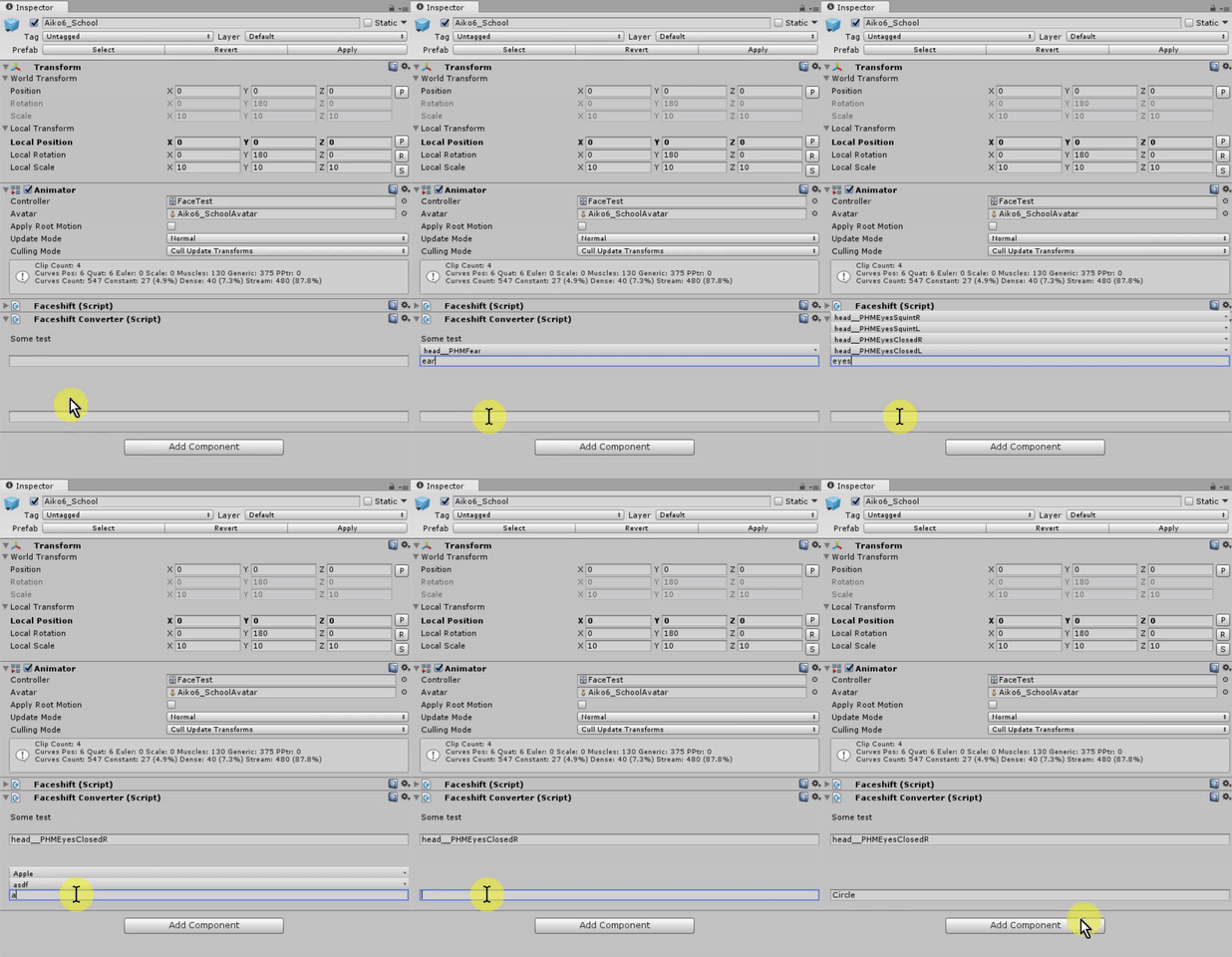
結果如下:
Source Code
using UnityEngine;
using UnityEditor;
using System.Collections.Generic;
public sealed class EditorExtend
{
#region Text AutoComplete
	private const string m_AutoCompleteField = "AutoCompleteField";
	private static List<string> m_CacheCheckList = null;
	private static string m_AutoCompleteLastInput;
	private static string m_EditorFocusAutoComplete;
	/// <summary>A textField to popup a matching popup, based on developers input values.</summary>
	/// <param name="input">string input.</param>
	/// <param name="source">the data of all possible values (string).</param>
	/// <param name="maxShownCount">the amount to display result.</param>
	/// <param name="levenshteinDistance">
	/// value between 0f ~ 1f,
	/// - more then 0f will enable the fuzzy matching
	/// - 1f = anything thing is okay.
	/// - 0f = require full match to the reference
	/// - recommend 0.4f ~ 0.7f
	/// </param>
	/// <returns>output string.</returns>
	public static string TextFieldAutoComplete(Rect position, string input, string[] source, int maxShownCount = 5, float levenshteinDistance = 0.5f)
	{
		string tag = m_AutoCompleteField + GUIUtility.GetControlID(FocusType.Passive);
		int uiDepth = GUI.depth;
		GUI.SetNextControlName(tag);
		string rst = EditorGUI.TextField(position, input);
		if (input.Length > 0 && GUI.GetNameOfFocusedControl() == tag)
		{
			if (m_AutoCompleteLastInput != input || // input changed
				m_EditorFocusAutoComplete != tag) // another field.
			{
				// Update cache
				m_EditorFocusAutoComplete = tag;
				m_AutoCompleteLastInput = input;

				List<string> uniqueSrc = new List<string>(new HashSet<string>(source)); // remove duplicate
				int srcCnt = uniqueSrc.Count;
				m_CacheCheckList = new List<string>(System.Math.Min(maxShownCount, srcCnt)); // optimize memory alloc

				// Start with - slow
				for (int i = 0; i < srcCnt && m_CacheCheckList.Count < maxShownCount; i++)
				{
					if (uniqueSrc[i].ToLower().StartsWith(input.ToLower()))
					{
						m_CacheCheckList.Add(uniqueSrc[i]);
						uniqueSrc.RemoveAt(i);
						srcCnt--;
						i--;
					}
				}

				// Contains - very slow
				if (m_CacheCheckList.Count == 0)
				{
					for (int i = 0; i < srcCnt && m_CacheCheckList.Count < maxShownCount; i++)
					{
						if (uniqueSrc[i].ToLower().Contains(input.ToLower()))
						{
							m_CacheCheckList.Add(uniqueSrc[i]);
							uniqueSrc.RemoveAt(i);
							srcCnt--;
							i--;
						}
					}
				}

				// Levenshtein Distance - very very slow.
				if (levenshteinDistance > 0f && // only developer request
					input.Length > 3 && // 3 characters on input, hidden value to avoid doing too early.
					m_CacheCheckList.Count < maxShownCount) // have some empty space for matching.
				{
					levenshteinDistance = Mathf.Clamp01(levenshteinDistance);
					string keywords = input.ToLower();
					for (int i = 0; i < srcCnt && m_CacheCheckList.Count < maxShownCount; i++)
					{
						int distance = Kit.Extend.StringExtend.LevenshteinDistance(uniqueSrc[i], keywords, caseSensitive: false);
						bool closeEnough = (int)(levenshteinDistance * uniqueSrc[i].Length) > distance;
						if (closeEnough)
						{
							m_CacheCheckList.Add(uniqueSrc[i]);
							uniqueSrc.RemoveAt(i);
							srcCnt--;
							i--;
						}
					}
				}
			}

			// Draw recommend keyward(s)
			if (m_CacheCheckList.Count > 0)
			{
				int cnt = m_CacheCheckList.Count;
				float height = cnt * EditorGUIUtility.singleLineHeight;
				Rect area = position;
				area = new Rect(area.x, area.y - height, area.width, height);
				GUI.depth-=10;
				// GUI.BeginGroup(area);
				// area.position = Vector2.zero;
				GUI.BeginClip(area);
				Rect line = new Rect(0, 0, area.width, EditorGUIUtility.singleLineHeight);

				for (int i = 0; i < cnt; i++)
				{
					if (GUI.Button(line, m_CacheCheckList[i]))//, EditorStyles.toolbarDropDown))
					{
						rst = m_CacheCheckList[i];
						GUI.changed = true;
						GUI.FocusControl(""); // force update
					}
					line.y += line.height;
				}
				GUI.EndClip();
				//GUI.EndGroup();
				GUI.depth+=10;
			}
		}
		return rst;
	}

	public static string TextFieldAutoComplete(string input, string[] source, int maxShownCount = 5, float levenshteinDistance = 0.5f)
	{
		Rect rect = EditorGUILayout.GetControlRect();
		return TextFieldAutoComplete(rect, input, source, maxShownCount, levenshteinDistance);
	}
	#endregion
}
使用很簡單在 Editor 的範圍內直接呼叫即可.
Usage Demo :
// string[] someNames = new[] { "Apple", "Banana", "Circle", "Rect" }
// string temp;
public override void OnInspectorGUI()
{
	temp = EditorExtend.TextFieldAutoComplete(temp, someNames, maxShownCount: 10, levenshteinDistance: 0.5f);
}
Bugs:
- 某些時候好像很難點到.
不支援摸糊對比, 更新後支援包含空格
// Updated : Fuzzy matching///////////////////////////////////
更新後支援有限度的模糊對比, 參考的是 萊文斯坦距離(Levenshtein Distance) 的做法.
原始版本: https://blogs.msdn.microsoft.com/toub/2006/05/05/generic-levenshtein-edit-distance-with-c/
這邊放一個備份:
/// <summary>Computes the Levenshtein Edit Distance between two enumerables.</summary>
/// <typeparam name="T">The type of the items in the enumerables.</typeparam>
/// <param name="lhs">The first enumerable.</param>
/// <param name="rhs">The second enumerable.</param>
/// <returns>The edit distance.</returns>
/// <see cref="https://blogs.msdn.microsoft.com/toub/2006/05/05/generic-levenshtein-edit-distance-with-c/"/>
public static int LevenshteinDistance<T>(IEnumerable<T> lhs, IEnumerable<T> rhs) where T : System.IEquatable<T>
{
	// Validate parameters
	if (lhs == null) throw new System.ArgumentNullException("lhs");
	if (rhs == null) throw new System.ArgumentNullException("rhs");

	// Convert the parameters into IList instances
	// in order to obtain indexing capabilities
	IList<T> first = lhs as IList<T> ?? new List<T>(lhs);
	IList<T> second = rhs as IList<T> ?? new List<T>(rhs);

	// Get the length of both.  If either is 0, return
	// the length of the other, since that number of insertions
	// would be required.
	int n = first.Count, m = second.Count;
	if (n == 0) return m;
	if (m == 0) return n;

	// Rather than maintain an entire matrix (which would require O(n*m) space),
	// just store the current row and the next row, each of which has a length m+1,
	// so just O(m) space. Initialize the current row.
	int curRow = 0, nextRow = 1;

	int[][] rows = new int[][] { new int[m + 1], new int[m + 1] };
	for (int j = 0; j <= m; ++j)
		rows[curRow][j] = j;

	// For each virtual row (since we only have physical storage for two)
	for (int i = 1; i <= n; ++i)
	{
		// Fill in the values in the row
		rows[nextRow][0] = i;

		for (int j = 1; j <= m; ++j)
		{
			int dist1 = rows[curRow][j] + 1;
			int dist2 = rows[nextRow][j - 1] + 1;
			int dist3 = rows[curRow][j - 1] +
				(first[i - 1].Equals(second[j - 1]) ? 0 : 1);

			rows[nextRow][j] = System.Math.Min(dist1, System.Math.Min(dist2, dist3));
		}

		// Swap the current and next rows
		if (curRow == 0)
		{
			curRow = 1;
			nextRow = 0;
		}
		else
		{
			curRow = 0;
			nextRow = 1;
		}
	}

	// Return the computed edit distance
	return rows[curRow][m];
}
這邊再做一個 overloader 為了簡單的 string 接口.
/// <summary>Computes the Levenshtein Edit Distance between two enumerables.</summary>
/// <param name="lhs">The first enumerable.</param>
/// <param name="rhs">The second enumerable.</param>
/// <returns>The edit distance.</returns>
/// <see cref="https://en.wikipedia.org/wiki/Levenshtein_distance"/>
public static int LevenshteinDistance(string lhs, string rhs, bool caseSensitive = true)
{
	if (!caseSensitive)
	{
		lhs = lhs.ToLower();
		rhs = rhs.ToLower();
	}
	char[] first = lhs.ToCharArray();
	char[] second = rhs.ToCharArray();
	return LevenshteinDistance<char>(first, second);
}

Pingback: Clonefactor | Unity3D Editor TextField AutoCompelete (Version 2)
The name `Kit’ does not exist in the current context
Kit.Extend.StringExtend.LevenshteinDistance
was posted above, sorry for the namespace.
just erase the Part <> and it works (after you paste the “fuzzy matching” stuff)
Hello!
Sorry for bothering. Ehm, of course I am a newbie. I need a “prediction search box” in my app. This app is a sort of dictionary, downloading data from an external sql database. So .. i “know” how to fill arrays from mysql, but now … i’d need a searching box for terms that would autocomplete like i saw in you demo. Is this possible with your code? How do you suggest me to proceed? Thanks!
G.
“Levenshtein Distance” its the core to do this kind of checking,
I study from https://blogs.msdn.microsoft.com/toub/2006/05/05/generic-levenshtein-edit-distance-with-c/
the rest of my code only depend on unity, hope it can help you.
Pingback: Опыт написания кастомного редактора, окна для инструментов, расширения для ускорение и автоматизации рутинных задач - myunity.dev